

React Server Components
Server Components are a new type of Component that renders ahead of time, before bundling, in an environment separate from your client app or SSR server. Rspack v2.0.0 and later have built-in full support for Server Components.
How to use
Rspack provides two solutions to support React Server Components:
- Using Rsbuild: Rsbuild provides out-of-the-box support for React Server Components, allowing you to quickly create a React Server Component project. See rsbuild-plugin-rsc for details.
- Manually Configuring Rspack: You can refer to this document to manually add configurations related to React Server Components.
Example
The rspack-rsc-examples repository contains full examples of building React Server Component applications using Rspack.
Install dependencies
React Server Components rely on the new architecture of React 19. Please ensure that both react and react-dom are version v19.1.0 or higher.
Basic Concepts
React Server Component artifacts require cooperative execution across both server and browser environments. To support this architecture, Rspack launches two Compiler instances to separately build the server and browser artifacts. The diagram below illustrates the overall build flow:
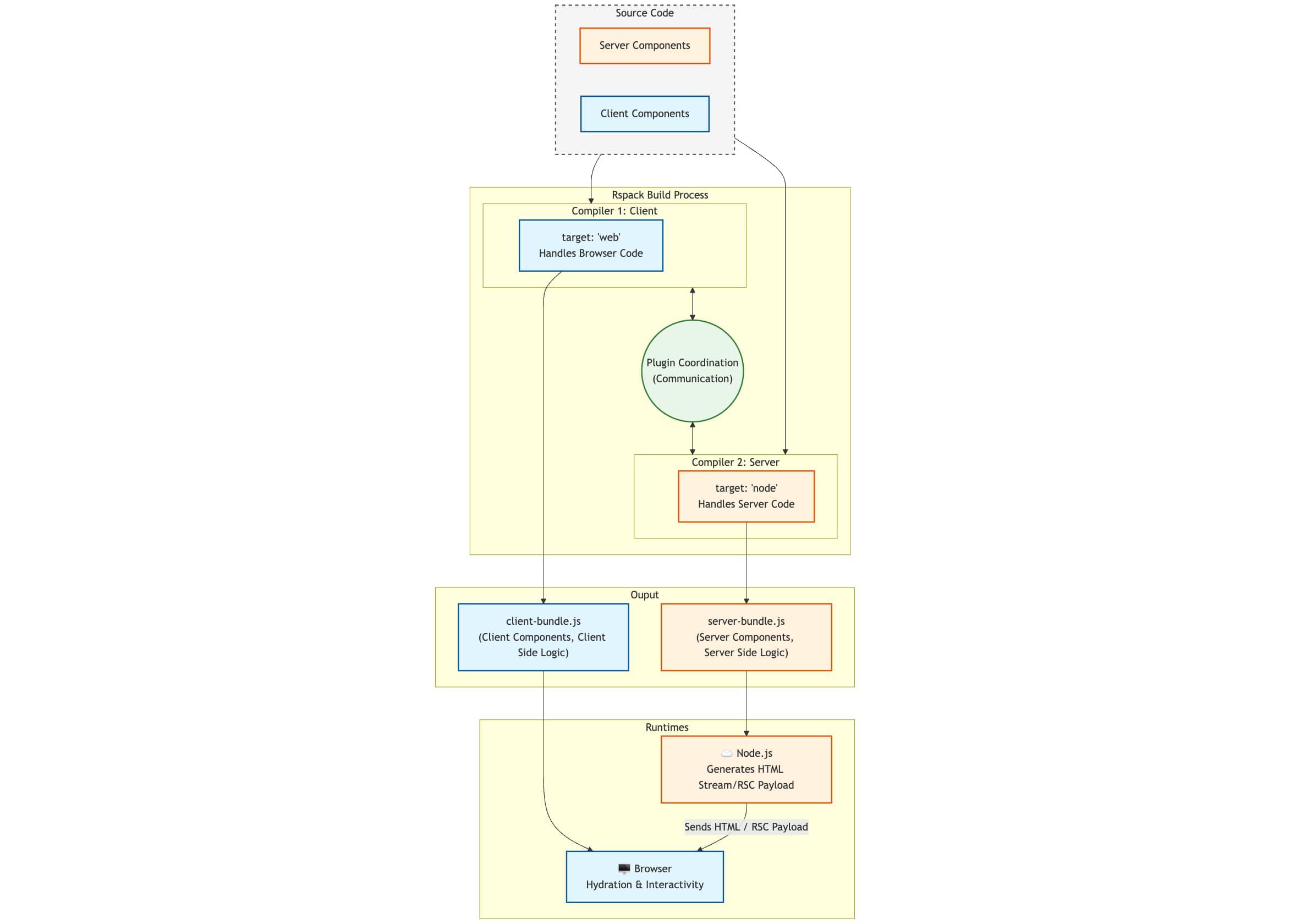
- Client Compiler (
target: 'web'): Responsible for generating code that runs in the browser. It primarily bundles Client Components, as well as CSS and static resources required by the application, and handles the hydration logic for components. - Server Compiler (
target: 'node'): Responsible for generating code that runs on the server. It handles the pre-rendering of React Server Components, bundles the execution logic for Server Actions, and handles code related to Server-Side Rendering (SSR).
In the configuration file, this corresponds to two Compiler configurations:
Configure plugin
Rspack supports React Server Components through a pair of coordinating plugins. You need to call rsc.createPlugins to generate ServerPlugin and ClientPlugin, and configure them into their respective Compilers:
These two plugins internally schedule the build processes of the Client Compiler and Server Compiler, establishing a communication mechanism to synchronize compilation states and module information, handle client components, and generate resource manifests.
Configure JSX/TSX
Add builtin:swc-loader to process .jsx and .tsx files. The rspackExperiments.reactServerComponents option must be enabled to turn on Rspack's support for RSC syntax.
The loader executes different transformation logic for "use client" and "use server" directives based on the layer to which the module belongs:
-
When the module belongs to
Layers.rsc(Server Component environment),react-server-dom-rspackis invoked for transformation:- Modules with
"use client"are transformed into Client References. - Modules with
"use server"are registered as Server Actions, enabling them to respond to remote calls from the client.
- Modules with
-
When the module does not belong to
Layers.rsc(e.g., client or SSR environments):"use server": The module is transformed into a Server Reference.
The RSC plugin also utilizes the directive information identified by the loader to distinguish between Client Components and Server Components.
Configure layer
In the Server Compiler, Rspack uses layer to identify modules that belong to the Server Component (RSC) environment.
To use RSC features, you must explicitly assign RSC components to Layers.rsc. The Loader will only transform "use client" directives into Client References for modules marked with Layers.rsc.
If you need Server-Side Rendering, you can use Layers.ssr to identify the SSR entry. SSR is optional; if no modules are assigned to Layers.ssr, Rspack will skip the generation of SSR artifacts.
Server Entry
"use server-entry" is a specific directive introduced by Rspack, designed primarily for framework developers. It is used to mark a Server Component as the logical entry point for a page or route.
When compiling a component with "use server-entry", Rspack generates the complete set of resources required to initialize the RSC application in the browser and records this information by mounting static properties directly onto the exported component:
- entryJsFiles: Bootstrap scripts. These correspond to the output of the build entry with the same name in the Client Compiler. They are responsible for initializing the React runtime and rendering flow on the browser side.
- entryCssFiles: Style resources. Rspack collects all CSS files depended upon by this Server Component and its descendant component tree.
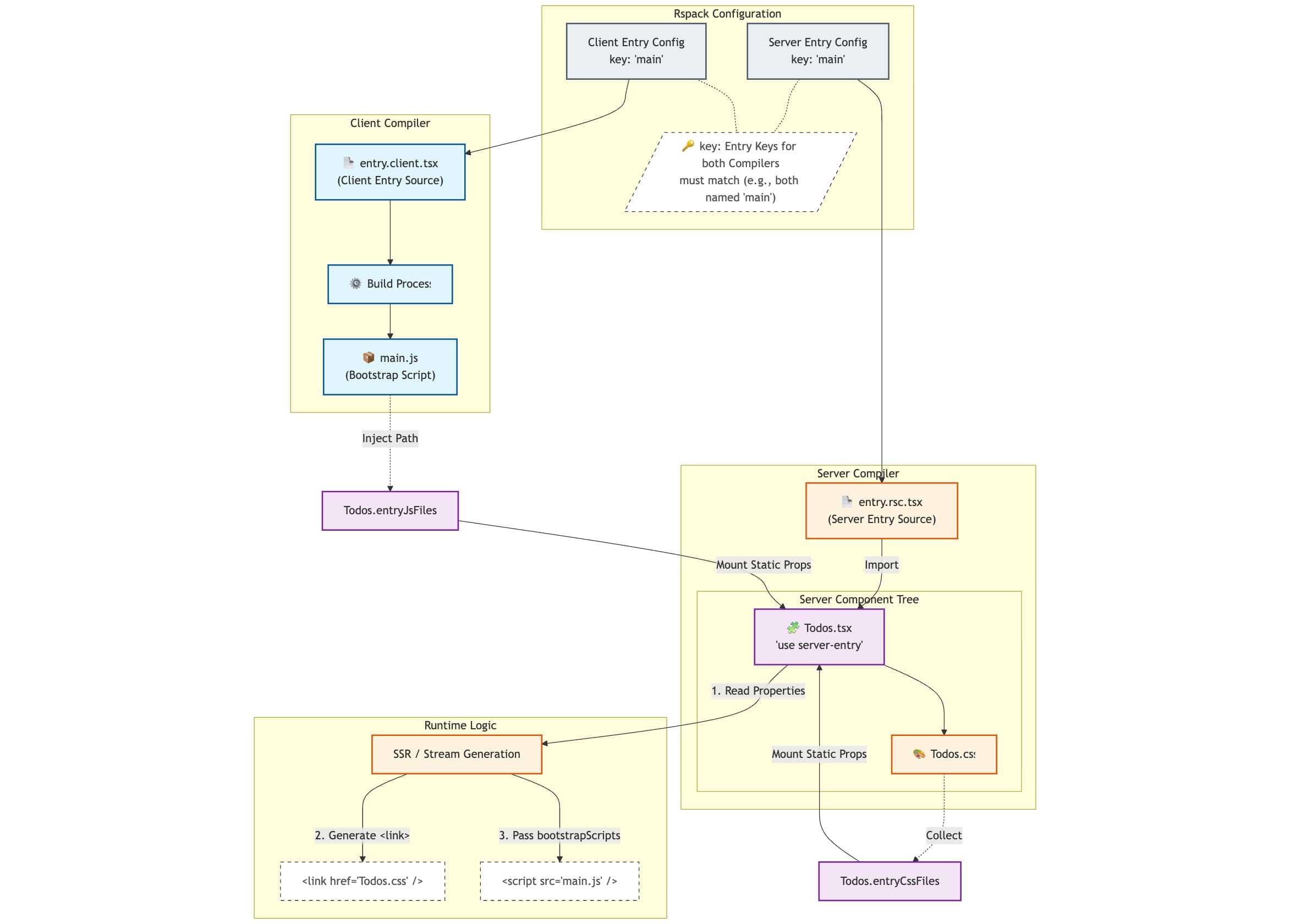
During the server runtime, you can directly access these static properties mounted on the component to construct HTML head resources:
Dev server
The RSC architecture requires handling client and server builds, responding to RSC requests, and managing server component HMR. Consequently, Rspack's built-in Dev Server cannot meet these requirements. You need to implement a custom development server to provide the following core capabilities:
- Handling RSC Requests: Intercept and process RSC (or SSR) requests initiated by the client, invoke the render logic using artifacts generated by the Server Compiler, and return the serialized RSC Payload (or HTML stream).
- Server Runtime Management: Execute server build artifacts in an isolated context (such as Worker Threads or child processes) to ensure environment isolation. Additionally, ensure that when server code updates, the old instance is cleanly destroyed and restarted to execute the new code.
- Server Component HMR: Monitor build changes in server components and notify the browser via communication mechanisms like WebSocket. Upon receiving the signal, the browser should trigger a re-request for RSC to update the page content.
To facilitate Server Component HMR, Rspack exposes the onServerComponentChanges hook within the ServerPlugin. You can use this callback to listen for build changes in server components and send update signals to the client: